
THE DIRECT ANSWER
Auto mode can draw a trace without a qualifying event. Normal mode waits for the trigger condition. Single acquisition stops after one qualifying capture. A blank or frozen display therefore needs a trigger check before it becomes evidence of a missing signal.
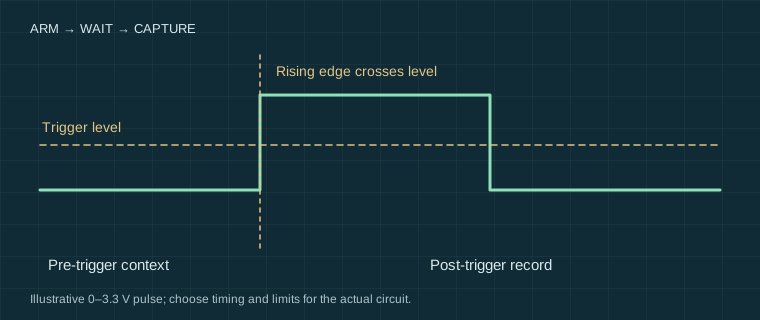
What each mode does
| Mode | Expected behaviour | Good first use |
|---|---|---|
| Auto | Acquires on a trigger or after an instrument-defined timeout | Finding a signal and setting scales |
| Normal | Waits for the selected event; a previous trace may remain | Checking whether a condition recurs |
| Single | Arms one acquisition, then stops on completion | Power-up, a button press or a one-off failure |
Names and sequencing vary by model. Read the status indicator: running, waiting, armed and stopped are different states. A stable trace in auto mode is not proof that the selected trigger condition has occurred.
Wire a repeatable event
For a first exercise, use a low-voltage microcontroller GPIO or a generator pulse output. Connect a correctly compensated 10× probe tip to the signal and a short reference connection to the circuit 0 V. Confirm that the scope, USB-powered board and generator references are compatible before connecting them.
- Use DC coupling, select the connected channel as trigger source and choose a rising edge.
- Set the trigger level between the observed low and high levels. For an ideal 0–3.3 V illustration, 1.65 V is a sensible starting value, not a universal logic threshold.
- Choose a time window long enough to include the event, and reserve pre-trigger memory to show what led up to it.
- Switch to single, arm the scope, then produce the pulse. Save the settings and the record.
For power-up, arm before applying low-voltage power. The probe can already be connected with power off. Trigger on a useful rail level or reset edge, rather than assuming the first screen refresh is the start of the event.
Rare faults need more than a single button
Pulse-width, runt and timeout triggers can target specific anomalies if the instrument supports them. A runt trigger generally looks for an edge that crosses one threshold but fails to reach another; it is not a universal “bad signal” detector. Serial decoding and serial triggering may have separate limits or licence requirements.
Holdoff changes when another trigger can be accepted and can stabilise a repeating burst. Too much holdoff can exclude the fault you want. Acquisition dead time also leaves intervals unobserved; a fast waveform-update figure and a deep-memory specification describe different capabilities.
If nothing appears, change one condition
Check source channel, slope, threshold, coupling and whether the scope is actually armed. Return briefly to auto to locate the signal, then return to the deliberate trigger. Noise near a threshold may trigger repeatedly; hysteresis or noise rejection can help but may also hide small events.
Record an explicit observation such as “no qualifying pulse captured during 60 seconds with this threshold and width condition”. Do not replace it with “no fault exists”. Next check sample rate and memory, and use a second channel to capture a possible cause such as reset or supply droop.
Sources and their limits
These references support the principles described here. External tests remain the original authors’ work. Check the exact model manual before connecting equipment.
- Tektronix — XYZs of Oscilloscopes primer ↗Manufacturer primer: acquisition, triggering, probes and measurement systems; not a test of our instruments.
- Elliott Sound Products — Oscilloscopes ↗Independent practical discussion of scope operation and measurement limitations.
Reviewed for this edition on 22 September 2026. How we use evidence →
Keep a record of the conditions.
Settings, circuit state and limitations belong with the reading. Our templates contain field headers only.
Measurement records & blank templates →